.avif)
Streaming into Iceberg creates three operational problems most teams don't see coming: small files pile up faster than you can compact them, storage costs climb because you're paying for data you've already replaced, and merges take much longer than they should.
The tooling around streaming is already there, with Spark Streaming, Flink, Kafka, and Kinesis all supporting Iceberg, and companies are already running streaming workloads at scale. But easier tooling doesn't mean that streaming is simple to operate.
After seeing these problems in real production data lakes, we decided to share more about the causes and possible solutions.
How Streaming to Iceberg Works
Before getting into the issues, let's establish what happens when you stream data into Iceberg.
Every streaming write, whether it's an insert or a merge, creates a new snapshot in Iceberg. Each snapshot consists of:
- A metadata JSON file
- A manifest list
- Manifest files
- Data files
This happens with every tick of your stream. If you're writing every 10 seconds, you're creating this entire metadata structure every 10 seconds.
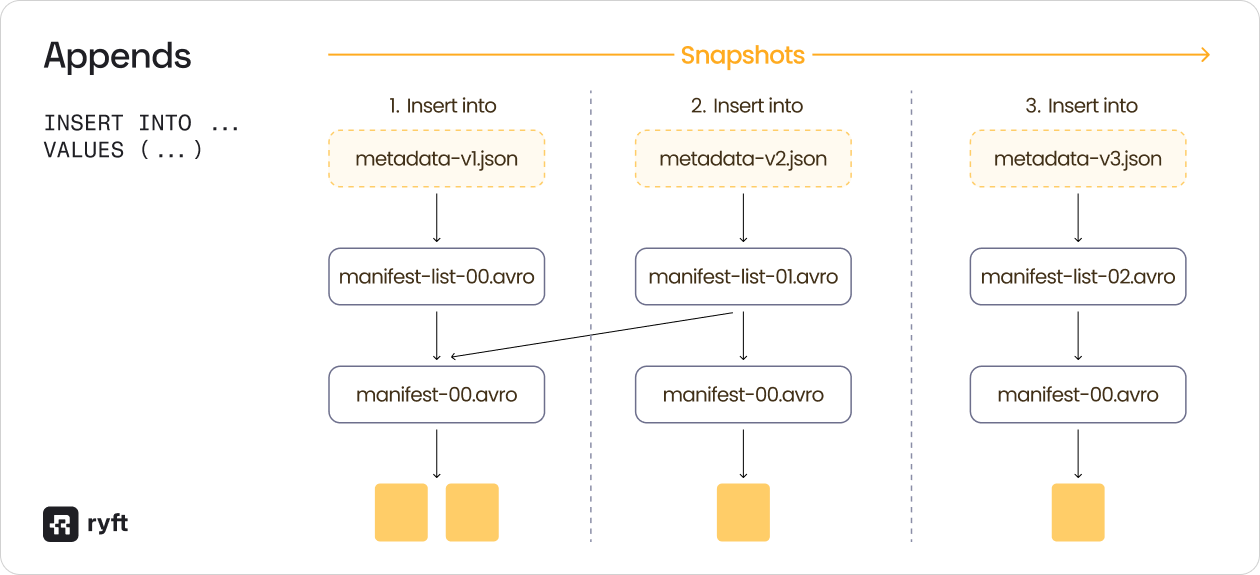
For append operations (INSERT INTO), the process is simple - each new snapshot points to new data files while reusing manifest files from previous snapshots where data hasn't changed.
For merge operations (MERGE INTO), it gets more complex. When you update or delete data, the new snapshot not only points to new data files but also marks old data files as deleted. These deleted files don't disappear, they remain in storage, tracked by your snapshot history for time travel.
Now imagine this running continuously every 10-15 seconds: hundreds of thousands of files can easily accumulate.
Problem 1: Small Files Slow Down Queries and Increase Costs
The small files problem is easy to understand but hard to solve at scale.
High-performance streaming creates tons of small files. If you're ingesting data every 10 seconds and each batch writes a 1 MB file, you're creating 8,640 files per day per partition. On a partitioned table with hundreds of partitions, that's millions of small files.
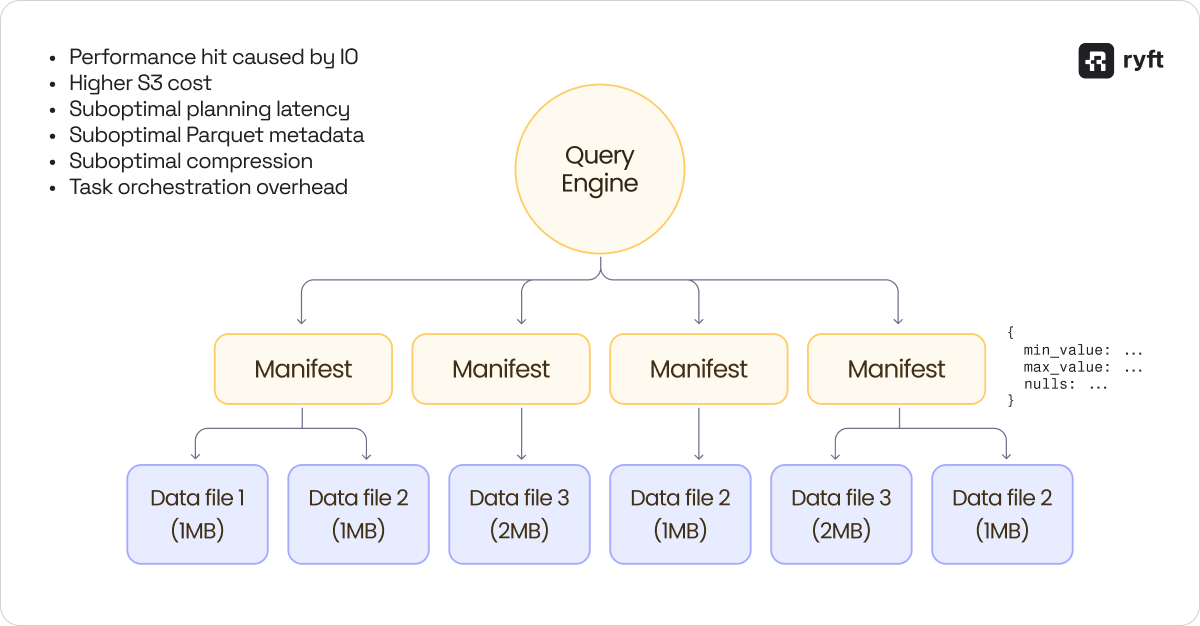
This creates three main problems:
- The query engine must read metadata for every file - min/max values, null counts, and row counts. With thousands of small files, planning a simple query can take longer than executing it.
- Read performance: Reading 1,000 small files is significantly slower than reading 10 large files with the same total data volume, even with perfect parallelization.
- S3 costs: Object storage pricing includes per-request costs. More files mean more requests, which in turn means higher bills.
One solution is compaction - take many small files and merge them into fewer large files; however, this is not trivial to achieve easily in high-throughput streaming environments.
Compaction in Streaming: The Cost Problem
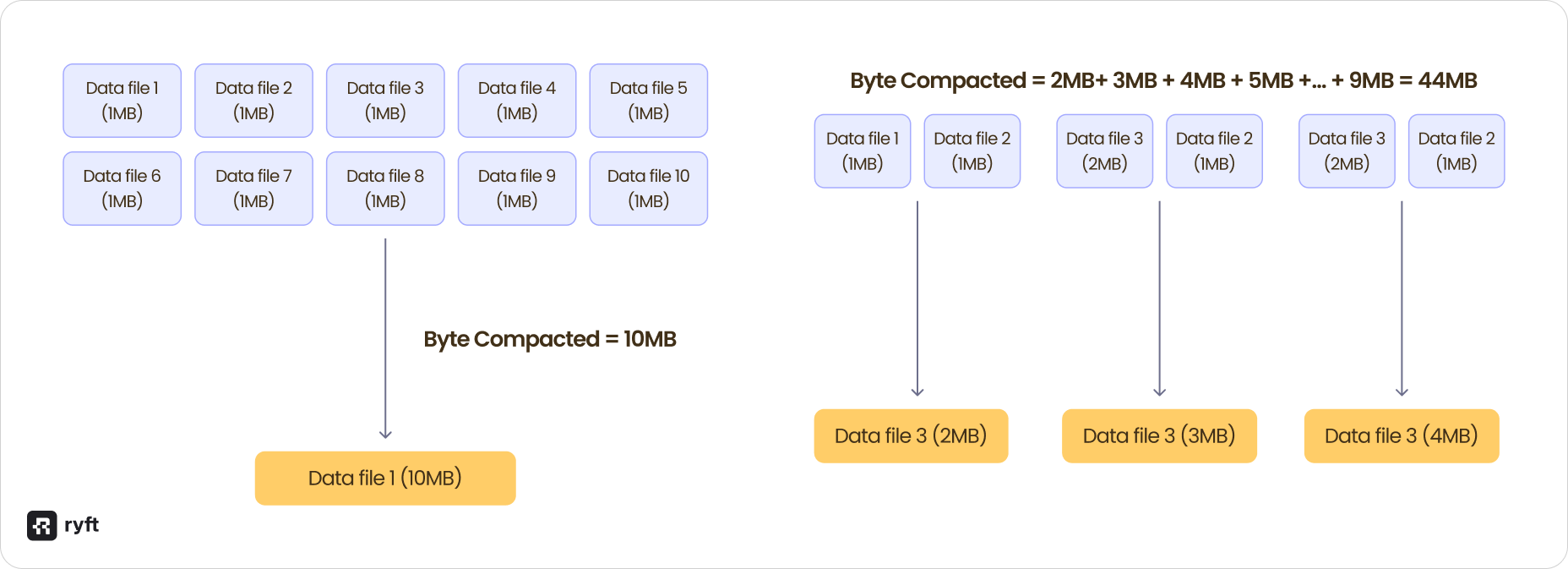
Let's compare two compaction strategies on the same streaming workload:
Strategy 1: Wait and compact
Wait for 10 micro batches of the stream (100 seconds), accumulate 10 files of 1 MB each, and compact them into a single 10 MB file.
Bytes compacted: 10MB
Strategy 2: Compact aggressively
Compact every 2 ticks by taking 2 files (2 MB) and compacting to 2 MB, then taking that 2 MB file plus the next 1 MB file and compacting to 3 MB, and continuing this pattern with every micro batch.
Bytes compacted: 44MB
Both strategies result in the same final file size, but strategy 2 compacted 4.4x more bytes to get there
Now, scale this to a petabyte data lake where Strategy 1 might need to process 10 TB in compaction while Strategy 2 could process 50 TB -same result, 5x the work (and possibly the cost).
This is what happens:
- Compact too infrequently: Users query small files, and performance suffers
- Compact too aggressively: Compute costs go up, and you rewrite the same data multiple times
How to Measure Compaction
If you're managing compaction yourself, track two metrics:
- Compaction cost: How much compute are you spending on compaction jobs?
- Small files read: How many small files are your queries actually reading?
The relationship between these metrics indicates whether your compaction strategy is working. If you're spending a lot on compaction, but users are still reading thousands of small files, something is wrong.
The right balance depends on your query patterns. If users query data immediately after it arrives, you need aggressive compaction regardless of cost. If queries typically look at day-old data, you can wait longer and compact more efficiently.
Compaction Considerations
Your compaction strategy depends on two decisions:
When to compact:
- Commit-based: After N commits
- File-based: When file count exceeds threshold
- Interval-based: Every X minutes/hours
- When not to run: Data that is not queried often
What to compact:
- Table priority: Critical tables first
- Partition priority: Recent partitions before old ones
- Late-arriving data: Do you re-compact old partitions when data arrives out of order?
For time-partitioned tables, it's almost always more important to compact today's partition than a partition from a year ago that nobody queries.
Problem 2: Active Storage Waste
Active storage measures how much of your stored data is actually being used versus how much you're paying to keep around for time travel.
The metric is simple:

In a healthy table, this should be above 85%. In streaming tables with compaction, it frequently drops to 40-50%.
Why Active Storage Drops in Streaming
This is what happens in a typical streaming scenario with compaction:
- Stream writes two 1 MB files
- Compaction merges them into one 2 MB file
- Stream writes another 1 MB file
- Compaction merges the 2MB + 1 MB into 3MB
- Stream writes another 1 MB file
- Compaction merges 3 MB + 1 MB into 4 MB
Your current snapshot shows 4 MB of data, this is what your users query and what you think you're paying for.
But your S3 bucket contains 9 MB: the current 4 MB file plus all the intermediate files from steps 1-5 that are still being retained for time travel.
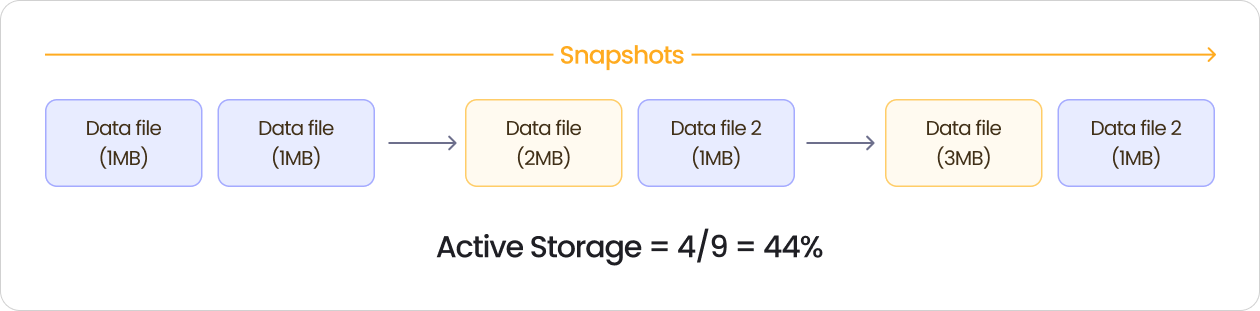
Active storage: 4 MB / 9 MB = 44%
If your S3 bill for this table is $100K per year, only $44K is for data your users actually query. The other $56K is for files you've already compacted but haven't deleted yet.
This only happens with compaction or use cases with merges / deletes. In append-only tables, every file in the snapshot history is relevant, but when you're constantly compacting and rewriting files, you leave a trail of unused files behind.
The Solution: Aggressive Retention in Streaming
The default approach to snapshot retention doesn't work for streaming. Most teams start with a time-based strategy: "keep 5 days of snapshots." This sounds reasonable for batch workloads where you might have 5-10 snapshots per day.
But in streaming, you're creating a new snapshot every 10-15 seconds. Over 5 days, that's 28,800 to 43,200 snapshots. Each snapshot potentially references files that have been compacted multiple times, making time-based retention the wrong strategy for streaming workloads.
Instead, use an absolute snapshot count or a much shorter time window. If you're creating snapshots every 10 seconds, you might want to retain only the last 1,000 snapshots (less than 3 hours) rather than 5 days' worth.
Keep your active storage above 85%. If it drops below that, you might be retaining too many snapshots and paying for too much unused storage.
Two retention strategies work:
- Absolute snapshot count: Keep the last N snapshots (e.g., last 1,000)
- Aggressive time window: Keep the last 2-4 hours instead of 5 days
Monitor your active storage metric continuously and if it starts dropping, tighten your retention policy.
Problem 3: Merges are Slow
If you search the Iceberg community Slack for "merge performance," you'll find hundreds of threads. Merges are slow in streaming workloads, and there's no simple fix.
A merge operation is both a read and a write query at the same time. You're scanning the table to find matching records, then replacing them. This dual nature makes merges significantly more expensive than appends.
Copy-on-Write vs Merge-on-Read
Iceberg supports two strategies for handling updates:
Copy-on-Write (CoW):
When you update a record, Iceberg rewrites the entire data file containing that record. The old file is marked as deleted, and the new file contains all rows with the update applied.
- Advantage: Query engines are happy as they just read data files without any merge logic
- Disadvantage: High write latency. In streaming, you're rewriting files on every write
Merge-on-Read (MoR):
When you update a record, Iceberg writes a small delete file that marks which rows to ignore while the original data file stays unchanged, and the query engine merges the data file and delete file at read time.
- Advantage: Much lower write latency, just write delete markers
- Disadvantage: Query performance degrades
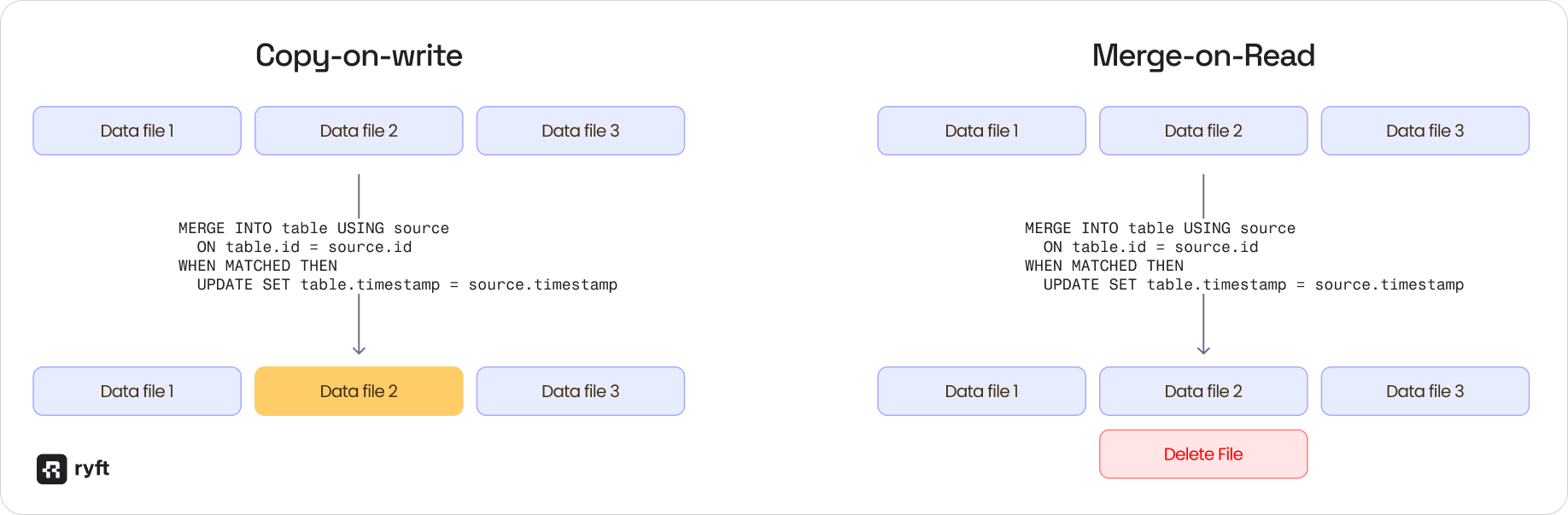
For streaming workloads, MoR is usually the better choice because it keeps write latency low, but you pay for it with more complicated compaction requirements.
Choose CoW if you can tolerate high write latency and want simple, fast queries. Choose MoR if you need low write latency and are willing to invest in asynchronous compaction.
Wrap Up
Streaming into Iceberg is an extremely popular use case, and is proven at petabyte scale in hundreds of production data lakes. The key is managing three problems:
Small files: Compact strategically - too little degrades query performance, but too much wastes compute. Measure compaction cost against the number of small files being read, then optimize for your query patterns.
Active storage: Default retention doesn't work for streaming. Use aggressive snapshot expiration and keep active storage above 85%.
Merges: Choose your write mode based on latency needs. If you go with Merge-on-Read, commit to a more aggressive compaction and retention to manage delete files.
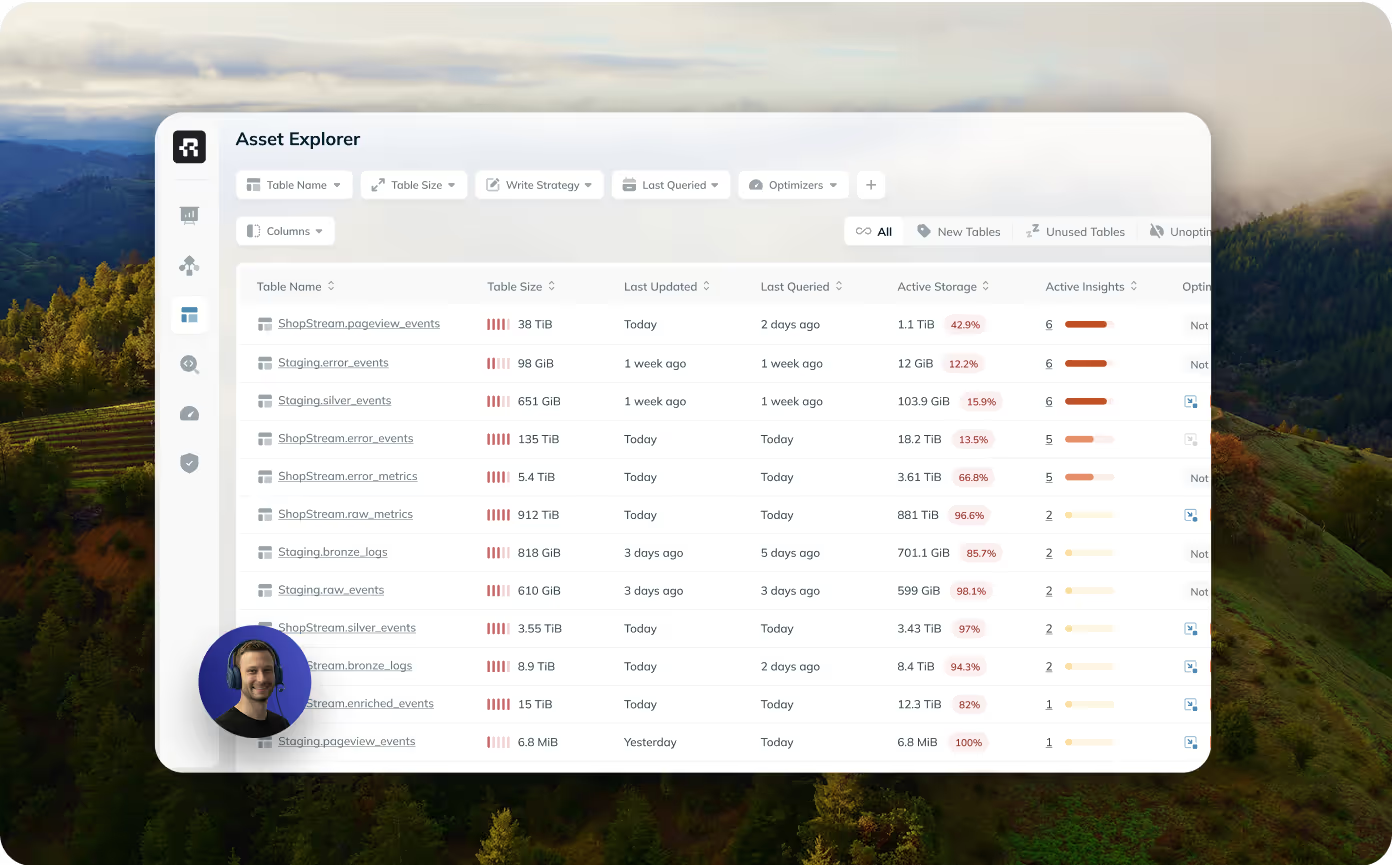
At Ryft, we specifically designed our adaptive optimization engine to optimize steaming workloads. The Ryft platform automatically monitors Iceberg metadata and adapts compaction and optimizations on a partition level to achieve best in class performance for high throughput data.
Want to see how Ryft handles streaming workloads? Talk to us about Ryft's Intelligent Iceberg Management Platform
Browse other blogs
.png)

Unlocking Faster Iceberg Queries: The Writer Optimizations You’re Missing
Apache Iceberg query performance is often limited long before a query engine gets involved. In a joint post with Firebolt, we break down why writer configuration, file layout, and continuous table maintenance matter most.
.avif)